A step-by-step guide from the MyDailyCash team. MyDailyCash is for adults 18+ — you can earn a Roblox gift card for yourself or as a gift for your kids.
Want a Roblox gift card without paying for it out of your pocket? With My Daily Cash you earn a balance by completing simple online offers, then redeem it for a Roblox gift card from just $5. This guide shows you exactly how, with screenshots of every step.
Quick answer: Create a free MyDailyCash account, complete offers on the Tasks page until your balance reaches $5, then open your Wallet → Gift Cards → Roblox, choose $5, $10, $25 or $50, and enter your email. Your Roblox gift card code is sent to that email.
What you need
- A free MyDailyCash account (18+)
- A verified email address — you can earn right away, but you need to verify your email before your first withdrawal
- A Roblox account to redeem the card on
- No VPN — offers are hidden while a VPN or proxy is on
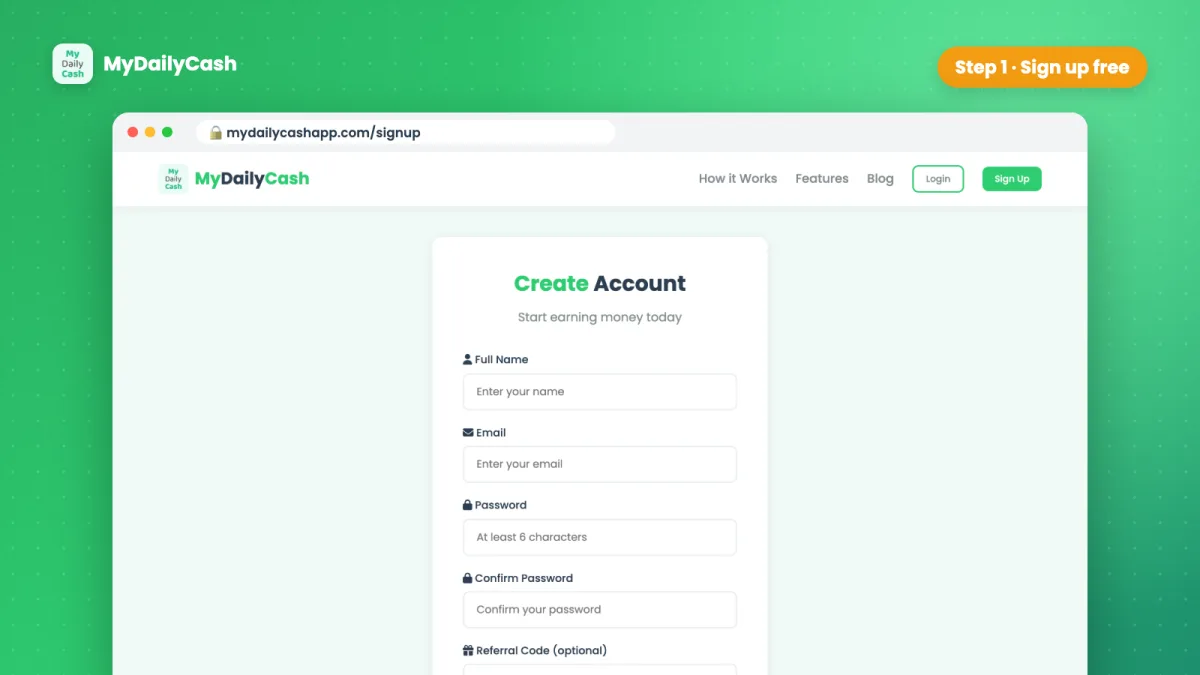
Step 1: Sign up for My Daily Cash (free)
Go to the sign-up page and enter your name, email and a password. It takes less than a minute and you get a small welcome bonus to start. If a friend invited you, add their referral code — it's optional.
Tip: on your phone you can also install the My Daily Cash app to your home screen in one tap, so you can earn wherever you are.
Step 2: Complete offers to earn your balance
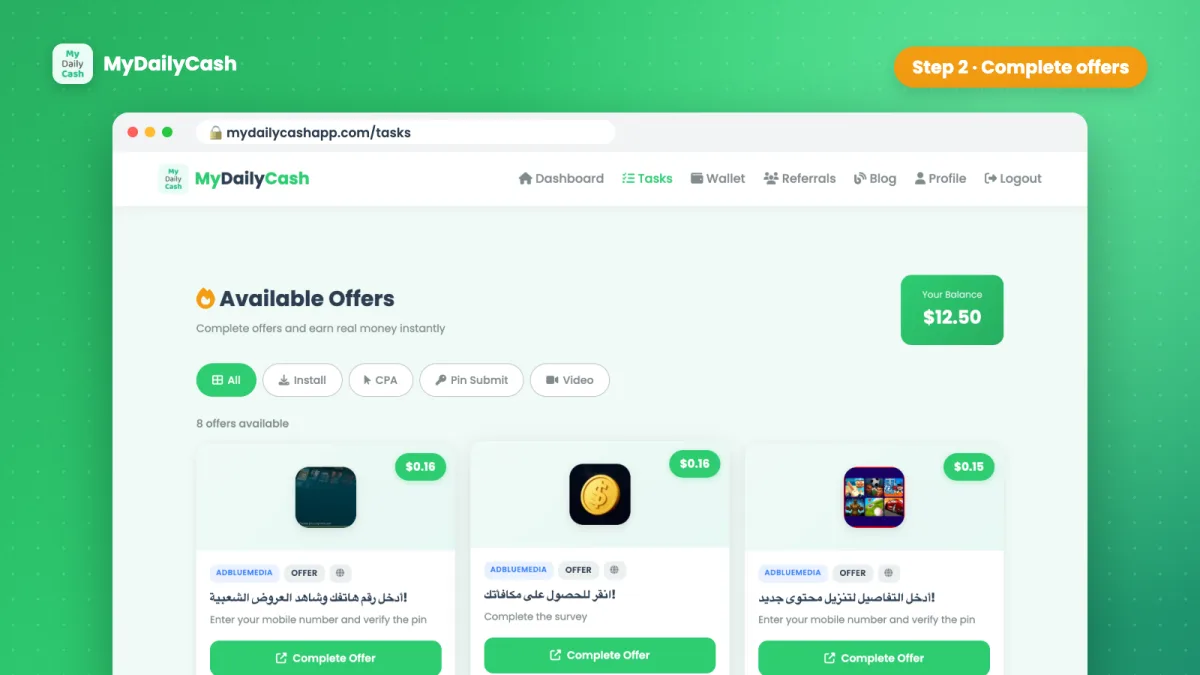
Open the Tasks page. You'll see a list of offers — for example installing and trying an app, playing a game to a certain level, or answering a short survey. Every offer shows its reward before you start, so you always know what you'll earn.
- Pick an offer and tap Complete Offer.
- Follow its instructions exactly (for example: install, open and play to level 10).
- The reward is added to your account once the offer network confirms it. Rewards are held for a few days, then move to your available balance automatically.
Earn a little faster:
- Daily check-in: claim a small bonus on your dashboard every day — it grows with your streak.
- Levels: reach Silver ($10 earned) and Gold ($50 earned) for bigger check-in bonuses.
- Referrals: invite friends from your Referrals page and earn 10% of what they earn.
Step 3: Redeem your Roblox gift card
When your available balance reaches $5:
- Open your Wallet.
- Under Withdraw Money, choose the Gift Cards tab.
- Tap Roblox.
- Select the amount: $5, $10, $25 or $50 (or enter a custom amount).
- Enter the email address where you want to receive the gift card, and confirm.
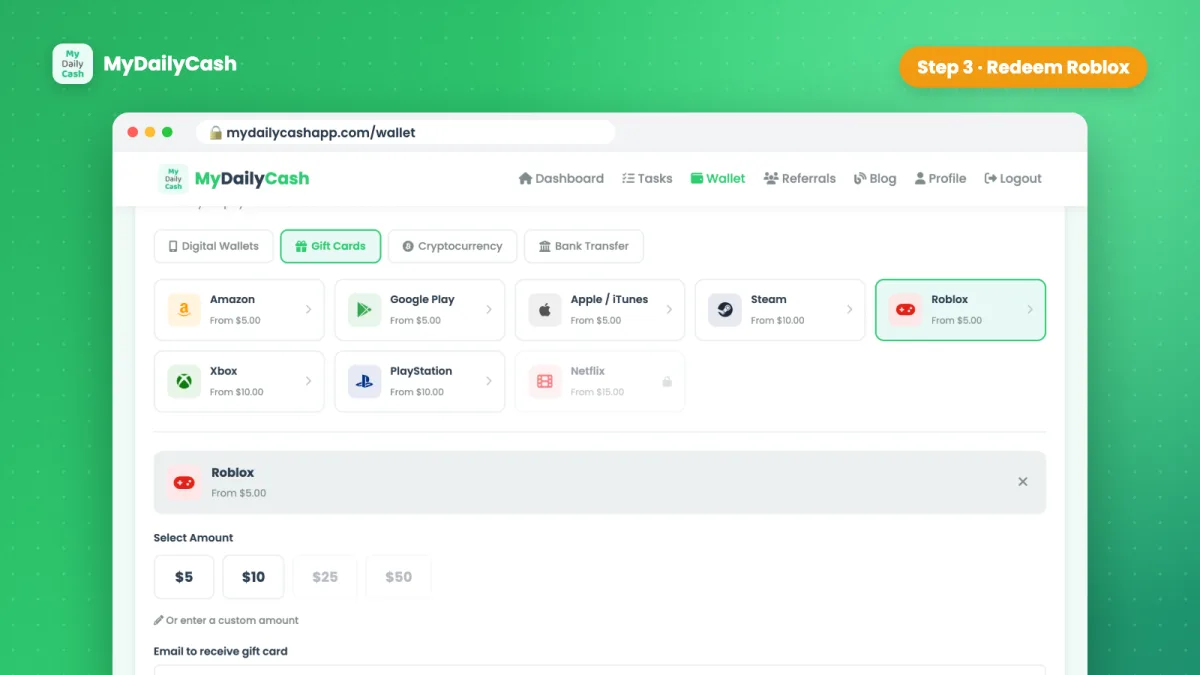
Our team reviews withdrawals and they are usually sent within 24–48 hours. You'll get an email when your request is received and another one with your Roblox gift card code.
Step 4: Redeem the code on Roblox
- Log in to the Roblox account you want to add the card to.
- Go to the official redeem page: roblox.com/redeem.
- Enter the code from your email and click Redeem.
- The value is added to the account — follow Roblox's on-screen instructions to use it for Robux or Premium.
Stay safe: avoid "free Robux" scams
Many websites and videos promise "free Robux generators". They don't exist — they are scams that try to steal Roblox accounts or personal data. Keep these rules in mind:
- Only redeem codes on the official roblox.com/redeem page.
- Never share your Roblox password with any website, including ours — MyDailyCash only needs an email to send your gift card.
- A real rewards app asks you to do something (complete offers) and shows the reward up front. If something promises Robux for nothing, walk away.
Want to know more about how we pay and where the money comes from? Read our honest review: Is My Daily Cash legit?
How long does it take to earn a Roblox gift card?
It depends on the offers available in your country and on your device. Some offers pay a few cents, others pay a few dollars. How fast you reach the $5 minimum depends on how many offers you complete — some people get there quickly, others take longer. Earnings vary, and MyDailyCash is a way to earn extra money, not a full income. Remember that rewards are held for a few days before you can withdraw them.
Other gift cards you can get
Roblox isn't the only option. From the same Wallet you can also redeem Amazon, Google Play, Apple, Steam, Xbox, PlayStation and Netflix gift cards, or cash out to PayPal, Cash App, Venmo or crypto. See how to start earning.
Frequently asked questions
Can I really get a Roblox gift card with My Daily Cash?
Yes. Roblox is one of the gift card payout methods in the MyDailyCash wallet. You earn your balance by completing offers, then redeem it for a Roblox gift card from $5.
What is the minimum for a Roblox gift card?
$5. You can choose $5, $10, $25 or $50, or enter a custom amount.
How do I receive the Roblox gift card?
By email. Enter the email address where you want to receive it when you request the withdrawal. Requests are usually processed within 24–48 hours.
Is this a free Robux generator?
No — free Robux generators are scams. With MyDailyCash you earn a real balance by completing offers, and you redeem it for an official Roblox gift card.
Can kids use MyDailyCash?
No. MyDailyCash is for adults 18+. Parents can earn a Roblox gift card and give it to their child as a gift.